The first place for any new member to start needs to be the Fubar Bible. The Fubar Bible is comprised of valuable information that will help answer most of the questions you may have to ask and will help guide you on knowing how Fubar functions.. Once you have read the Fubar Bible and you feel you have more questions feel free to always stop by Fubar Support Lounge where a member is always there to help you in any way that is suitable for your needs..
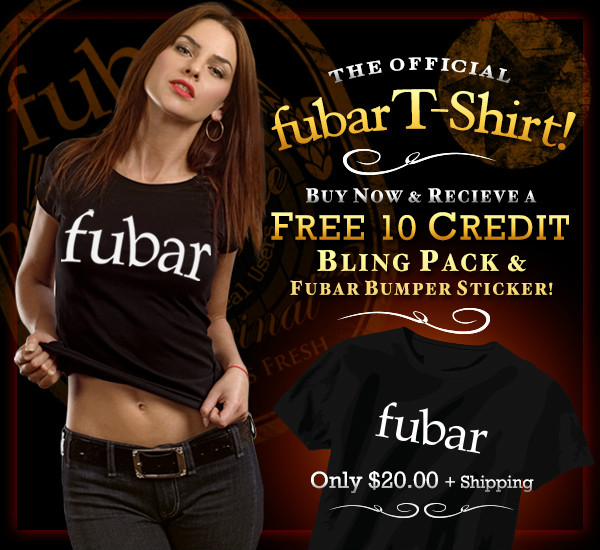
The NEW T-Shirt Offer is Here. Get 10 Bonus Bling and
some Bumper Stickers for Buying a shirt.
Click on the banner to order NOW!
 |  MEMBERSHIP MEMBERSHIPDo you want to make points, Level ups, and Fubucks fast?
Then become a VIP (Very Important Person). With a VIP MembershipYou get the following: - Up to 10,000 picture slots
- 50 family members
- Choose between the following nickname colors:
blue / pink / white or bolded gray - 10,000 bonus points for signing up!
Click here to read about becoming a VIP.. |
Below is a few of the questions and things you will find listed in the Fubar Bible... 1. How can I verify my e-mail?  |
|---|
To verify your email, you will need to go to your profiles settings page located under the "My" link on the header bar under "Settings". When the page loads click on the "Verify Email" link next to your sign-up email (If verified you will have a green check). 
If not already verified an email from fubar will be generated to your sign-up address account (ie your Yahoo, Hotmail, Gmail account, etc) where you will be prompted to follow the verification process. If you cannot find the email, please be sure to check in your spam and/or your bulk folders as the email can get trapped in there. If you have trouble entering the token onto the verify email page, please try it through a different browser as some browsers, dependent on your system, do not take the verify token. If your Not receiving emails from fubar:
There are a few things that you can check when you are not receiving emails from fubar. First of all, make sure your email address is correct, and that you have your email notifications on in your account settings. You can also see if your email address is blacklisted in your account settings. Your email will be added for a few reasons; if the emails we send to you bounce and cannot reach your inbox, or if you mark our emails as spam are a few.
You can have your email address removed from the blacklist by verifying your email address in your account settings or writing a private message to fubar support.
Also, make sure you add the following email addresses to your allowed list on your email account:
alerts@fubar.com
emails@fubar.com
hollidays@fubar.com
invites@fubar.com
This will cover all of the email addresses that we send information to you about upcoming events on fubar, notifications, and special emails that we whill send out. |
Fubars Top Menu | Home | My  | Bling | Hottest | Latest | Games | Drinks | |  | Connect | Search | Invite | Help |
| 2. What are fu-points & fu-bucks? |
|---|
| fu-Points |
|---|
fu-Points are what you earn while you surf and interact with other members on fubar. The more points you have the more levels you will attain. When you reach a certain level, you will unlock features and benefits such as increased photo storage, ability to rate and comment more photos, ability to create MuMMs and more. You can see your point total on your home page or profile page. Points also help your Ranking; the more points you have in comparison to everyone else on the site, the higher your ranking! Fubar.com Admin or Fubar Bouncers will not reveal how many points you receive for what action, but you receive points for nearly everything you do while interacting with others on fubar.
Points are awarded when you:
→ Rate a photo
→ Leave a photo comment
→ Leave a comment
→ Rate a member's profile
→ Upload a mobile photo
→ Someone becomes your fan
→ Someone adds you as a friend
→ Take someone's cherry comment
→ Configure your mobile phone
→ Successfully invite someone to join fubar and earn up to $5,000 fubucks
→ Successfully complete a survey
→ Post a Blast! - earn points each time you post a BLAST on fubar! Send special shoutouts to other members.
→ Host a Happy Hour- get a commission of ALL points made during your Happy Hour
→ VIP members earn a whooping 10,000 fuBucks signing bonus! (See details above for more details!)
→ Give out Bling and earn credits for yourself and those you give it to
→ Run Auto 11s so all rates count as an 11!
→ Run a Cherry Bomb and rate whole folders at a time for an entire hour
Hint: There are some things not listed which earn you points too! ;-) But that is one of Admin's secrets that shall not be revealed. |
| fu-Bucks |
|---|
As you earn Points, you will also earn fu-Bucks. You will accumulate both fu-Points and fu-Bucks at the same time for each interaction and will never go away. But unlike fu-Points you have the ability to spend fubucks. The difference is fu-Points will always accumulate and never decrease, but fuBucks can be spent on Virtual Gifts, Happy Hours, fu-Own Members, Transfer and buy fu-Blast. You can use the fuBucks you gain on any member that is on fubar! Use them to either flirt, cheer someone up, or just for fun! You will find the fubar Gift Shop link on a member's profile page in the top left section. fuBucks can also be used to buy users in fuOwned, to purchase extra guesses in the Admirer game and to buy yourself a one day fu-Blast!
fuBucks will cap out at 100 Trillion (100,000,000,000,000) and you cannot earn more than that.
If you earn more than 1 trillion fuBucks in a day it will not be added to your total. |
|
| 3. What is a buzz meter? |
|---|
The buzz meter (Buzz bar) is on every member's profile. You first start off with 0% buzz (or dry), and can get all the up to 100% (sh*t faced!) The only way to get a buzz is to either have other members buy you drinks from the Gift Shop, the Bling Shop or have members use abilities on you. The more drinks you receive, the more your buzz meter will increase. The higher your buzz is when you receive points, the more bonus points you receive! You cannot buy yourself drinks. Remember, the point here is to interact with others!
**Hint: When buying drinks from the Gift Shop area or the Bling Shop area pay attention to percentage bar above the drinks.
(Drink options with the 100% bar will get *any member* sh*t faced!)0% Dry Buzz 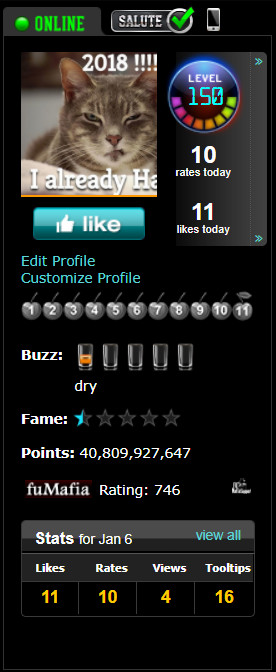
| 100% Normal Sh*tface 
| Ability Sh*tface 
|
|
| 4. How can I upload images? |
|---|
Photos can easily be uploaded into your gallery by clicking on the âMy â link on the 'Main Menu' and then selecting the âPhotosâ link in the drop down menu. From your Images Page, click the blue "Add Photos" link at the top right of the page. 
When the page loads ou should see a page with a Java Applet on it.
(Commonly Called The Multi-Image Loader) 
If the Mulit-Loader doesnt work for you there is another tab that will go to the traditional upload tool
(Please Note: Image formats are .jpg, .jpeg, .gif or .png with 1Megabyte(MB) for the filesize). 
Unless otherwise specified, the photos will be automatically uploaded to your Default Album.
To Send a picture from your Mobile Device, please read this blog for (How To) Setup A Mobile Address. |
| 5. What does NSFW & SFW mean? |
|---|
To learn more about this section, please read the blog titled (How To) Displaying Content.
What do I do if I constantly get messages stating an image of mine was marked NSFW?? - This section will try to explain the three main functions that go with marking an image but its best that you read the blog listed above..
- Marked Completely NSFW:
- This happened because the image was not Safe For Use anywhere on fubar.com's webspace.
- This happened because the image was to Grotesque to use anywhere on fubar.com's webspace.
- These images are given a NSFW mark and cannot be used on any portion of the website.
- These images cannot attain points due to their NSFW nature. - Marked Not Safe As A Primary:
- This likely happened because fubar.com thought it would not be suitable for primary use as a default image.
- These images still attain points but can no longer be used as a Primary Image. - Final Call:
- Always remember a Fubar Bouncer will always have the "Final Call" on whether an image(s) is deemed Not Safe For Work or Safe For Work
|
| 7. Someone is harassing me, What can I do? |
|---|
If you are having any issues with another member on fubar, please block and ignore this member. fubar staff and bouncers will NOT get in the middle of any member disputes. To BLOCK a member, go to their page and look for the block user link.
Per fubar's Terms of Service Section 7 regarding member disputes: You(the member) are solely responsible for any and all interactions that you may encounter with other fubar.com Members. fubar.com, Inc. reserves the right, but has no obligation, to monitor disputes between you and other Members.
If you have someone blocked and they are going around this feature, please report it to a Fubar Bouncer or send a message to Fubar Support. |
| 8. How can I fancy up my profile? |
|---|
| Add Profile Skin |
|---|
To add a background to your profile you can either Browse Skins or if you wish to create your own skin you may wanna read this blog that will show you the basics on (How To) Create Profile Skins. If you chose to use another members skin make sure to Preview the skin to make sure it still works with fubar's code logic, if you still like that particular skin, click on the 'Rip This Skin' link and it will become yours. Please Note: A new member who has not been on the site for a minimum of 10 days will not be able to view any profile skins. |
|
| 9. I'm bored, what else is there? |
|---|
If your bored on fubar try visiting a lounge, playing the slots, rate how a band plays or play fumafia. All you have to do is go to the main menu click on 'Games' and choose what you want to do. | Lounges |
|---|
A lounge is an area where members can chat and listen to music. Lounges are governed by the Owner/Staff of the lounge you visit so please follow their rules and policies. Each lounge has its own unique setting and genre of music. If you don't like that lounge all you have to do is move into a new lounge and get acclimated with the other members or staff. To visit lounges all you have to do is Browse Lounges |
| fuMafia |
|---|
This is a role playing game that allows members to do missions, join turfs and hitlist, kill or just beat a members profile to smithereens. The blog titled (How To) Setup fuMafia will explain how to setup a fuMafia player and give some insight into the game. Please Note: At the time this blog is written the blog (How To) Setup fuMafia is currently being worked on. |
|
| 10. Why does my browser come to a crawl? |
|---|
The reason is most likely since fubar is a site with alot of images this means your browser is capturing each image to make it easier to load the next time.This is commonly referred to as cache and is not a problem that cann be cleared. If your browser does resemble a slowness effect don't be alarmed, its just time to clean those cache files and start a new session. - To start a new cookie / cache session you need to go to this blog Cleaning_Cookies & Cache and follow the instructions carefully.
- If the Browser continues to Lock Up try running it in Safe Mode (ie. without Plugins / Extenstions).
- If the browser doesn't lockup anymore then it it a problem with one of your plugins or extenstions.
- If it's an Extension Issue you will need to manually turn off each Extension till you find the source that is causing to Slow Down or Crash.
- If its a Plugin Issue you will need to run a Plugin Check and make sure your Plugins are Up-To-Date.
|
If you have any further questions about this or any other topics about setting up your profile
Please feel free to leave a comment on this blog or private message a Fubar Bouncer and they will try to help you the best they can.
For faster results you can also visit the Support Lounge and the staff/members will help you to the best of their abilities.. |